


Kura Sushi Rewards
4.7389.00 Reviews
App Specs
- Version
- 2.0
- Updated On
- License
- Free
- Downloads
- 100,000+
- Developer
- Kura Sushi USA
- Categories
- Food & Drink
- Platform
- Android
Screenshots
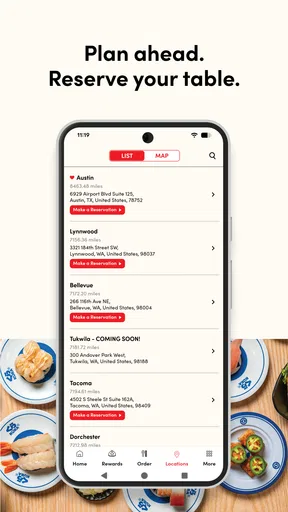
 Analysis by AppCompare
I opened Kura Sushi Rewards with a very specific situation in mind: I wanted to make a visit to Kura Revolving Sushi Bar feel less like a one-off meal and more like a planned stop. The app is built for that moment. It brings together loyalty rewards, coupons, and a waitlist in one place, so the useful question is not simply whether it looks polished, but whether it reduces the small bits of effort between deciding to eat there and actually sitting down.
After using it as a Food & Drink app, my impression is positive but practical. This is not an all-purpose restaurant guide, and it is not trying to replace every ordering or reservation tool. Its value depends on whether Kura Sushi is already part of your routine. If it is, keeping rewards and visit planning together can be convenient. If you only visit occasionally, the app may feel more like an extra step than an essential companion.
From deciding on sushi to getting through the door
The developer is Kura Sushi USA, and the app is free with an Everyone age rating. It runs on Android with a minimum OS requirement of 10, and the current version is 2.0. Those details make it approachable for a broad range of phones, although compatibility still depends on the device you use and how current its operating system is.
The first useful handoff is between intention and action. I can decide that I want Kura Sushi, open the app, and look for the tools that matter to that visit instead of switching between a loyalty account, a coupon message, and a separate waitlist process. That consolidation is the main design idea here. It does not make the restaurant visit automatic, but it gives the visit a clearer starting point.
For example, imagine leaving work with two friends and deciding to eat sushi without knowing whether a table will be available. The normal alternative is to call, check a general restaurant service, or arrive and hope for the best. With this app, the waitlist function becomes the first practical step. I can use the app before leaving, pass the plan to my friends, and arrive with a better sense of what needs to happen next.
That workflow matters because restaurant apps often fail at the handoff between digital planning and an in-person visit. A coupon may be stored in one place while the queue is handled somewhere else. Here, the tools are gathered around the same Kura Sushi visit, which makes the app easier to understand than a broad dining app filled with restaurants I do not intend to use.
Checking the useful tools before leaving
I would start by opening the app before heading to the restaurant rather than waiting until I am standing at the entrance. The waitlist is the feature with the clearest time-saving potential, but it only helps if I use it early enough to influence my plan. Joining a queue at the last second may still leave me waiting, so I treat it as a planning aid rather than a guarantee of immediate seating.
Worth Reading Before You Choose

EA SPORTS FC Mobile 26 Is a Bigger Football Game, but It Takes Time

Flipboard Shows What News Apps Must Do Beyond the Feed

Switching to Android Auto Means Rethinking Your Driving Routine

Google Calendar Makes a Crowded Week Easier to Manage

Ludo King Makes the Most of the Minutes Between Plans

Baby Panda World Brings Quick Play to Modern Phones, but Its Game Library Feels Busy
The same principle applies to coupons. A coupon is most useful when I check it before ordering, not after the meal has already been decided. Looking early gives me time to understand what I intend to use and to avoid building a plan around an offer I have not reviewed carefully. I would also keep the phone ready when moving from the app to the restaurant staff, because the digital step still needs to become a real-world conversation or redemption moment.
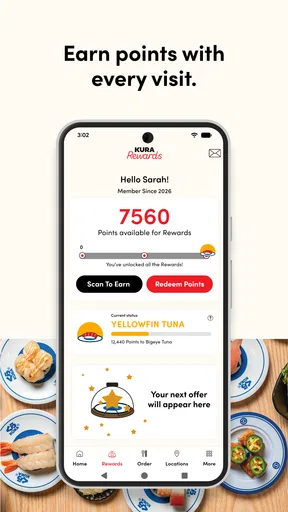
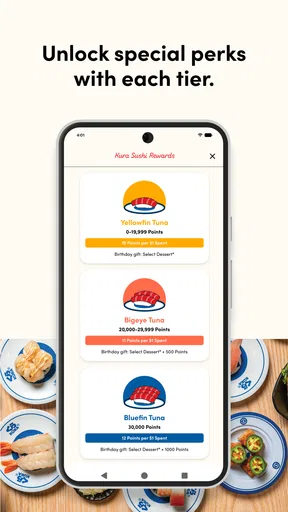
The rewards area adds a longer-term reason to return. Instead of judging the app only by what it does on one visit, I see it as a record of an ongoing relationship with the restaurant. That makes it more appealing to regular diners than to someone looking for a single meal. The app’s store rating is a 4.7 average from around five thousand ratings, and it has passed over one hundred thousand installs, which suggests that this focused approach has found an audience.
I would not interpret those figures as a promise that every visit will be frictionless. A high rating can tell me that many people find the app useful, but my experience still depends on the restaurant, the phone, the connection, and how clearly I understand the next step. The best way to use it is to see rewards, coupons, and waitlist access as separate tools that support one meal, rather than expecting one button to handle the entire experience.
Using the waitlist as a planning handoff
The waitlist is where the app connects most directly with the restaurant’s physical operation. My action begins on the phone, but the result depends on what happens at the location. That makes timing important. If I am coordinating a family meal, I would join the list before everyone arrives, then tell the group that the digital step has been completed and that we still need to follow the restaurant’s instructions when we get there.
This is a small but important distinction: joining a waitlist is not the same as receiving a table. The app can help me start the process, but it does not remove the need to pay attention to the queue or communicate with the people I am dining with. If one person joins the list and the others assume the table is secured indefinitely, the handoff can become confusing.
For a spontaneous solo meal, I might find the waitlist less valuable. I can often make a quick decision and tolerate some uncertainty. For a group, especially when children or a fixed schedule are involved, the feature becomes more useful because it lets the group plan around the expected restaurant process instead of discovering the wait at the door.
Keeping rewards and coupons connected to the meal
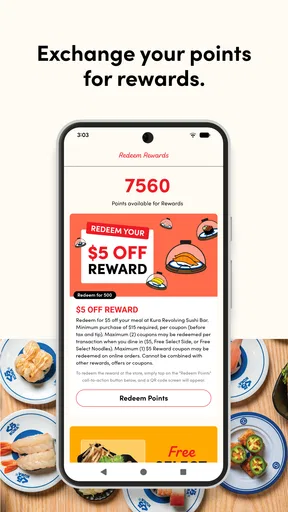
The rewards function changes how I think about repeat visits. I would use it before ordering to see whether there is a relevant coupon or reward, then make sure I know what needs to be shown or selected when the meal reaches the payment or checkout stage. That preparation is more reliable than trying to remember an offer later.
This is also where a little discipline helps. I would not assume that having a coupon visible means it has already been applied. The useful workflow is to inspect the offer, confirm that it fits the visit, and then follow the restaurant’s redemption process. The app supports the handoff, but the staff and the final transaction still determine whether the benefit is actually used.
For someone who visits Kura Sushi regularly, this can turn a vague loyalty program into something I remember to use. The reward is not only the eventual benefit; it is the reminder to check before each visit. For an occasional diner, however, the mental overhead may outweigh the advantage. If I am unlikely to return, I may not want another account or app routine for a single meal.
I also like the separation between planning and loyalty. I can use the waitlist because I need a table today, or use a coupon because it fits tonight’s meal, without pretending that every feature has the same value. That lets me choose the part of the app that solves the immediate problem instead of browsing through unrelated restaurant content.
What happens when the phone meets the restaurant
The most important handoff happens at the entrance. I arrive after starting the digital process, but the restaurant team remains the point of contact for the actual seating experience. I would be ready to explain that I joined the waitlist and to show the relevant screen if needed. This sounds simple, yet it is exactly the kind of step that can be missed when people assume the app communicates every detail automatically.
The coupon handoff is similar. I would open the app before the meal reaches its final stage, keep the offer easy to find, and avoid waiting until the phone is locked or the connection is unreliable. That is not a criticism unique to this app; it is the reality of using a phone as part of an in-person transaction. Still, it means the app works best when I treat it as preparation rather than a completely hands-off service.
There is another handoff within a group. One person may manage the waitlist while another pays or handles the coupon. If that division is not discussed, the group can lose time searching for the right account or screen. My practical approach would be to have one person own the digital part from start to finish and tell everyone else what has been done. That avoids duplicated actions and keeps the restaurant interaction clear.
Compared with a general restaurant discovery app, this focused setup is easier when I already know where I want to eat. A broader service may be better for comparing nearby restaurants, reading across different businesses, or planning a meal without a specific chain in mind. Kura Sushi Rewards is stronger once the decision has already been made: it helps me manage the relationship with Kura Sushi rather than helping me choose between every possible restaurant.
The outcome after a successful visit
When the workflow goes well, the app gives me three practical outcomes. I can begin managing the wait before arrival, use a relevant coupon with less last-minute searching, and keep loyalty activity associated with future visits. None of these changes the food itself, but together they can make repeat dining feel more organized.
The strongest result is reduced uncertainty. I know where to start when I want to visit Kura Sushi, and I do not need to remember several unrelated processes. For a regular customer, that convenience can justify keeping the app installed. It is especially helpful when the visit is shared with other people, because the waitlist and coupon steps can be handled before the group reaches the restaurant.
The result is less impressive if my dining pattern is irregular. A person who visits once every few months may forget the app exists, miss the chance to check a coupon, or decide that using a general restaurant service is simpler. In that case, the app’s narrow focus becomes its main limitation. It is deliberately useful for Kura Sushi, not broadly useful for every meal.
I would also judge success by whether the app fits my habits. If I already check my phone before restaurant visits, adding a quick look at rewards and the waitlist feels natural. If I dislike managing digital loyalty programs, the app will not change that preference. The free price removes the financial barrier, but it does not remove the time or attention required to use the features well.
Where the workflow can break
The first weak point is timing. A waitlist tool cannot make an unexpectedly busy restaurant empty, and joining too late may not change the amount of waiting very much. I would use it before leaving whenever the visit matters, but I would still keep the group flexible. Treating the app as a reservation guarantee would create the wrong expectation.
The second weak point is the boundary between the app and staff. A digital status can be helpful, yet the restaurant remains the authority on seating and coupon handling. If the app screen and the in-person situation do not seem to match, I would ask the staff rather than repeatedly tapping through the app. The phone is a tool for starting and organizing the process, not a substitute for the restaurant’s instructions.
The third issue is attention during payment. Coupons and rewards are easy to forget when the meal is busy, particularly in a group. My workaround is to check them before ordering and again before the transaction is finished. That two-stage habit is more dependable than relying on memory after the meal.
There is also a practical reason some people should skip it: the app is not a general-purpose dining planner. If I want to compare menus across many restaurants, find a new cuisine, or manage bookings from different businesses, I would choose a broader service. This app makes more sense when Kura Sushi is already the destination and I want the restaurant-specific tools in one place.
Device compatibility is another basic consideration. The app requires Android 10 or later, so anyone using an older Android phone should check compatibility before building a visit around it. For supported devices, the current version is 2.0, but I would still keep the app updated when possible because restaurant-related tools are most useful when the phone and service are communicating properly.
Who will get the most from it
I would recommend it first to people who visit Kura Sushi often enough to care about rewards. The app has a clear role for them: check for a coupon, manage the waitlist when needed, and keep the loyalty process close to the restaurant visit. Families and groups can also benefit because one person can handle the digital preparation before everyone arrives.
It is a good fit for diners who prefer planning but do not want a complicated restaurant platform. The app does not ask me to browse an enormous catalog of unrelated places before I can do something useful. I open it with a specific destination in mind, which makes the focused design feel efficient.
I would be more cautious about recommending it to someone who rarely eats at Kura Sushi, avoids loyalty programs, or usually chooses a restaurant at the last minute without checking the queue. That person may download it, use one feature once, and then gain little from keeping it around. In that situation, a normal map or restaurant-discovery tool may be the better everyday choice.
My final view is that Kura Sushi Rewards succeeds when I use it as a bridge between a digital plan and a real restaurant visit. It does not eliminate every handoff, and it cannot guarantee a fast table or a trouble-free redemption. What it does provide is a sensible place to begin: rewards, coupons, and waitlist access are gathered around the Kura Sushi experience instead of scattered across separate routines.
For me, that makes it worth installing if Kura Sushi is part of my regular dining rotation. I would open it before leaving, check the offer I intend to use, start the waitlist early when the group needs it, and keep the phone ready for the in-person handoff. Used that way, the free app feels genuinely practical rather than decorative. If Kura Sushi is only an occasional choice, I would skip the extra routine and rely on broader restaurant tools instead.
Pros
- Earn points and rewards from eligible Kura Sushi purchases.
- Digital membership makes it easy to keep rewards in one place.
- Useful for checking available offers before visiting a restaurant.
- Can provide member-only promotions and bonus-point opportunities.
- Helps regular customers track progress toward future rewards.
Cons
- Rewards may be limited to participating Kura Sushi locations.
- Points and offers can have expiration dates or other restrictions.
- Requires account registration and sharing some personal information.
- Benefits may be modest unless you visit Kura Sushi frequently.
- App usefulness depends on current promotions and restaurant availability.
FAQs for Kura Sushi Rewards
What is Kura Sushi Rewards?
Kura Sushi Rewards is the loyalty program connected with Kura Sushi locations and its official ordering experience. It is designed to give returning customers access to points, promotional offers, and other member benefits when they dine in or place eligible orders. The exact rewards, availability, and earning rules can vary by location, account status, and current promotion.
How do I join and use Kura Sushi Rewards?
To use Kura Sushi Rewards, you generally need to create an account through the official Kura Sushi website or app, provide the requested contact information, and sign in before making an eligible purchase. Depending on the restaurant and ordering method, you may need to scan, identify your account, or use the same email or phone number connected to your membership so the visit can be properly recorded.
How are points earned and redeemed in Kura Sushi Rewards?
Points are normally earned on qualifying purchases according to the current terms of the rewards program. Taxes, tips, delivery charges, gift card purchases, and promotional items may not qualify, so it is important to check the offer details before ordering. Once enough points or credits are available, they can usually be exchanged for eligible rewards during checkout or at participating restaurants.
Do Kura Sushi Rewards points expire?
Kura Sushi Rewards points, coupons, and promotional benefits may have expiration dates or other usage restrictions. The applicable deadline can depend on the type of reward, the date it was issued, and the terms shown in your account. Before saving points for a future visit, review the reward details carefully, because expired benefits may not be restored or extended.
Is Kura Sushi Rewards available at every Kura Sushi location?
Availability and participation may differ between Kura Sushi restaurants, regions, and ordering channels. Some offers may apply only at participating locations, while certain rewards may be limited to dine-in purchases, online orders, or specific menu items. Before downloading or relying on the program, confirm that your preferred restaurant accepts Kura Sushi Rewards and review the current local terms.


